Wireless camera survey · Forensic mapping

Know which cameras can see a place.

Camsweep is a self-contained field unit that maps wireless cameras, video recorders and camera systems around a location. You walk the area with a phone; the unit listens to the radio spectrum, places every camera-like signal on an offline map and keeps a timestamped, hash-sealed record of everything it heard.

No cloud. No internet. Nothing leaves the device.

2.4 + 5 GHzWi-Fi monitor mode
BLEpassive Bluetooth
GNSSposition + disciplined clock
0 bytessent to any cloud
9:41
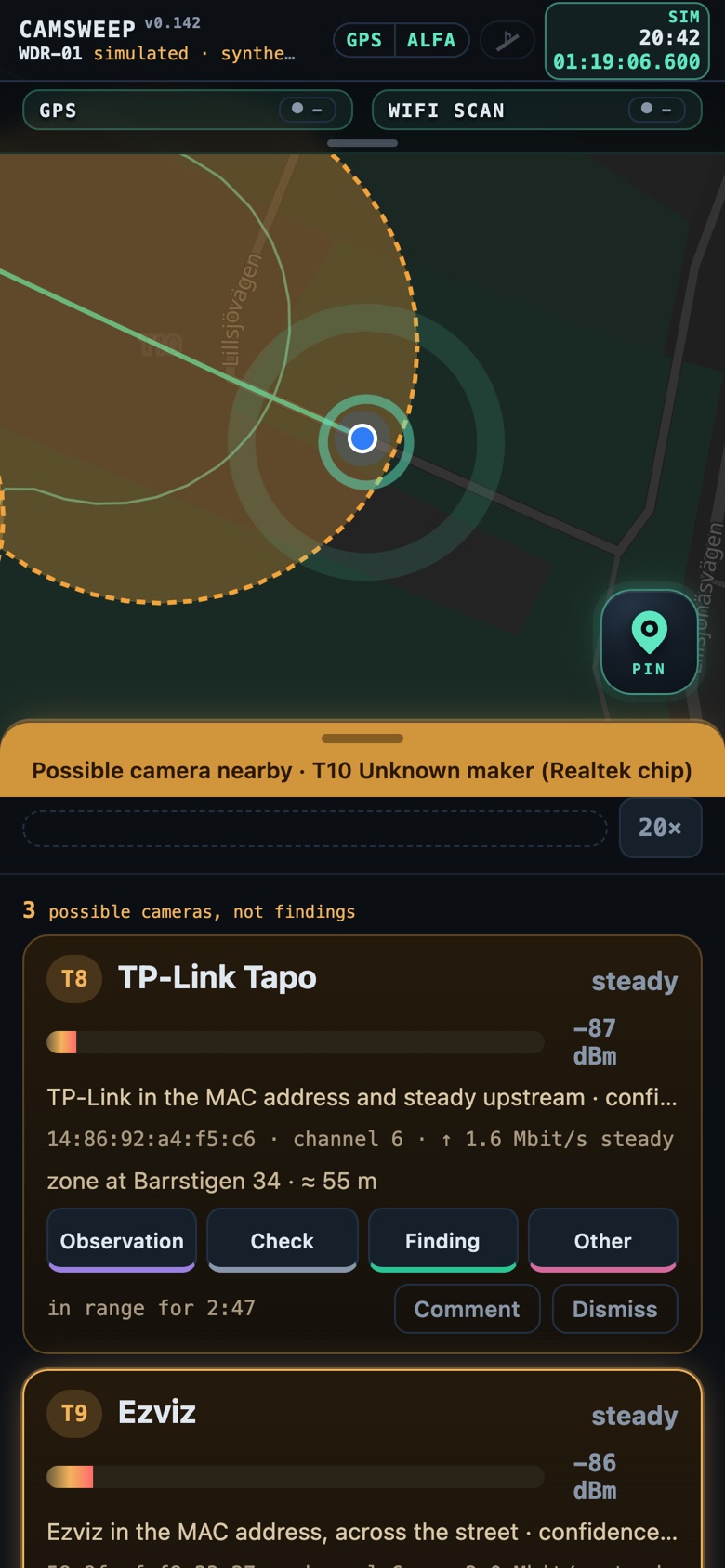
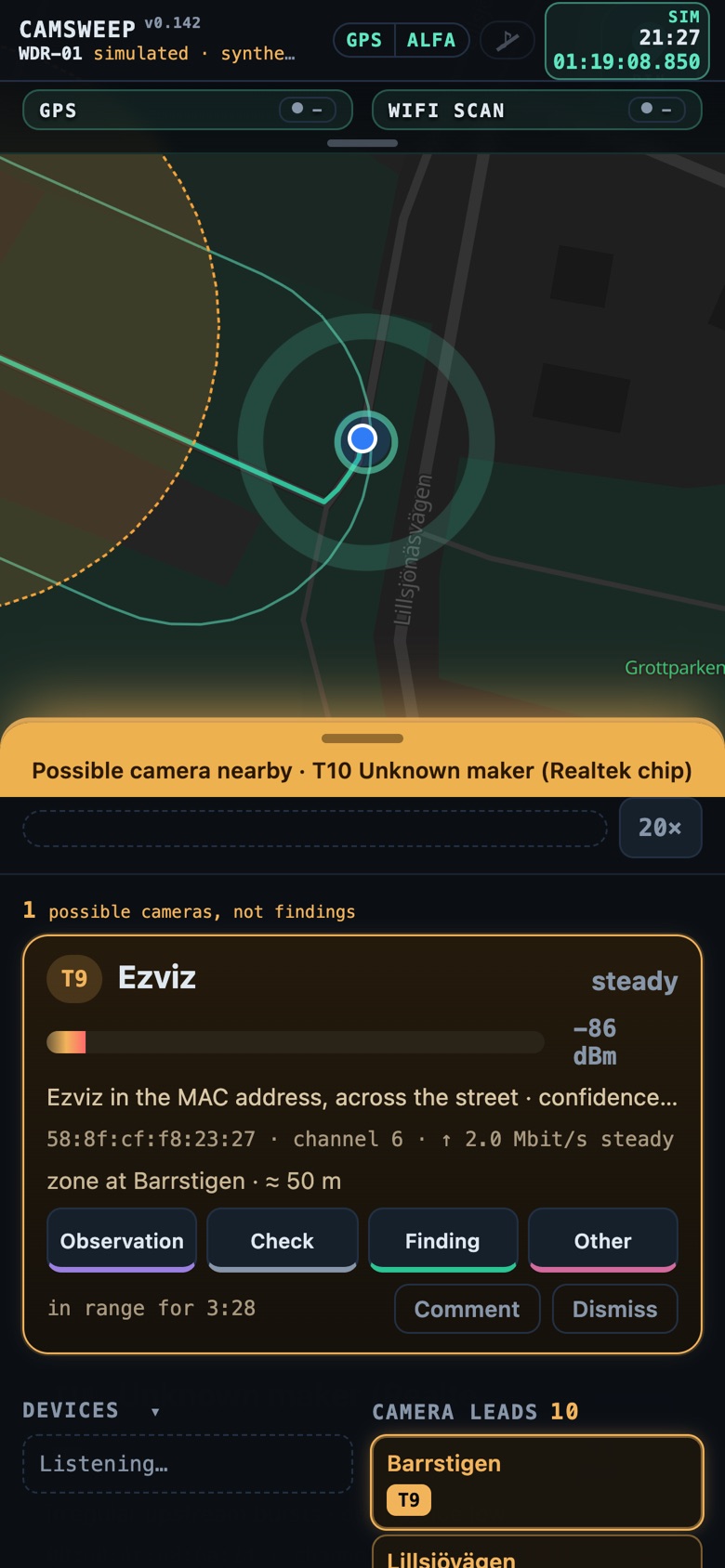
Camsweep field view: offline map with camera leads, the operator's track and the live list of camera candidates
Field view · simulated session, synthetic data
The problem

Most cameras today are wireless, small and unlisted.

Doorbells, battery cameras, Wi-Fi bullet cameras and recorders are installed by private households, shops and housing associations every day. They are rarely registered, often not visible from the street, and the people responsible for a site, an investigation or someone's safety usually have no inventory of them.

Finding them by eye is slow and incomplete. Camsweep finds them by what they cannot hide: their radio.

Typical questions Camsweep answers
  • Which cameras could have recorded what happened at this address, and where should footage be requested?
  • Is this room, venue or vehicle route covered by wireless cameras we do not know about?
  • What camera infrastructure exists on this network, by make, model and open services?
  • Has the camera landscape around a site changed since the last survey?
Two modes

Walk and listen. Or, with authorisation, look inside.

The operator chooses the mode on the first screen. The two modes look and behave differently on purpose, so there is never doubt about which one is active.

OFFLINE

Passive radio survey · never transmits

The Wi-Fi radio runs in monitor mode and hops across 2.4 and 5 GHz channels. Bluetooth LE advertisements are collected in parallel. Every frame is stamped with GNSS position and time. The operator simply walks; the unit decides when it needs more time and asks the operator to stop.

  • Passive: the survey radio sends no probe, association or scan request
  • Camera leads appear on the map as zones with an uncertainty radius
  • Leads grouped by nearest street address, not by brand
  • Works with no network at all: maps, addresses and analysis run on the unit

ONLINE

Authorised network inspection · visible on the network

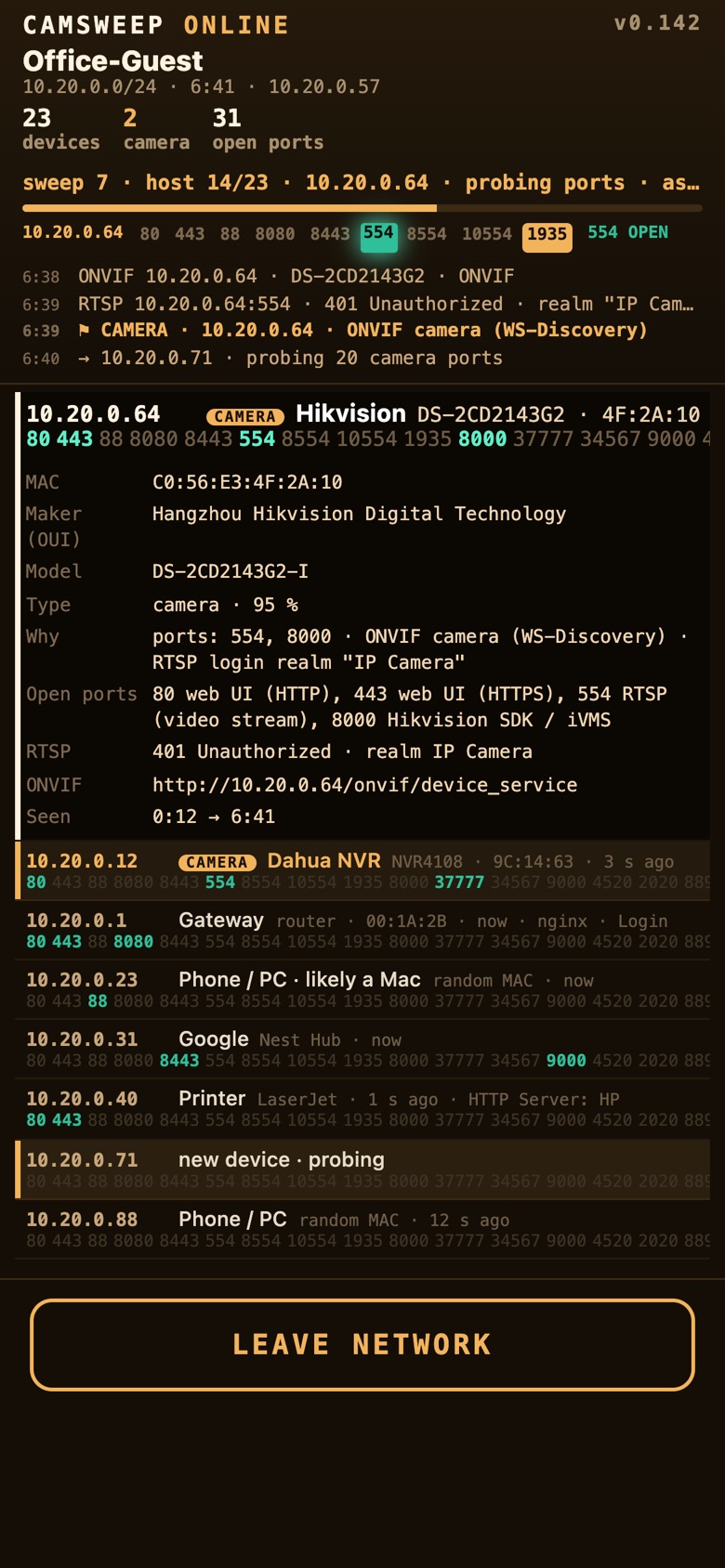
When the operator has the right to do so, the unit joins a target Wi-Fi network and inspects it from the inside: every host, its open camera and recorder ports, and what the devices say about themselves.

  • Legal grounds and an explicit confirmation are required and recorded before joining
  • ONVIF WS-Discovery, SSDP/UPnP and mDNS identify make and model
  • RTSP and HTTP questions confirm real video services
  • The network password is used once and never stored or logged
9:41
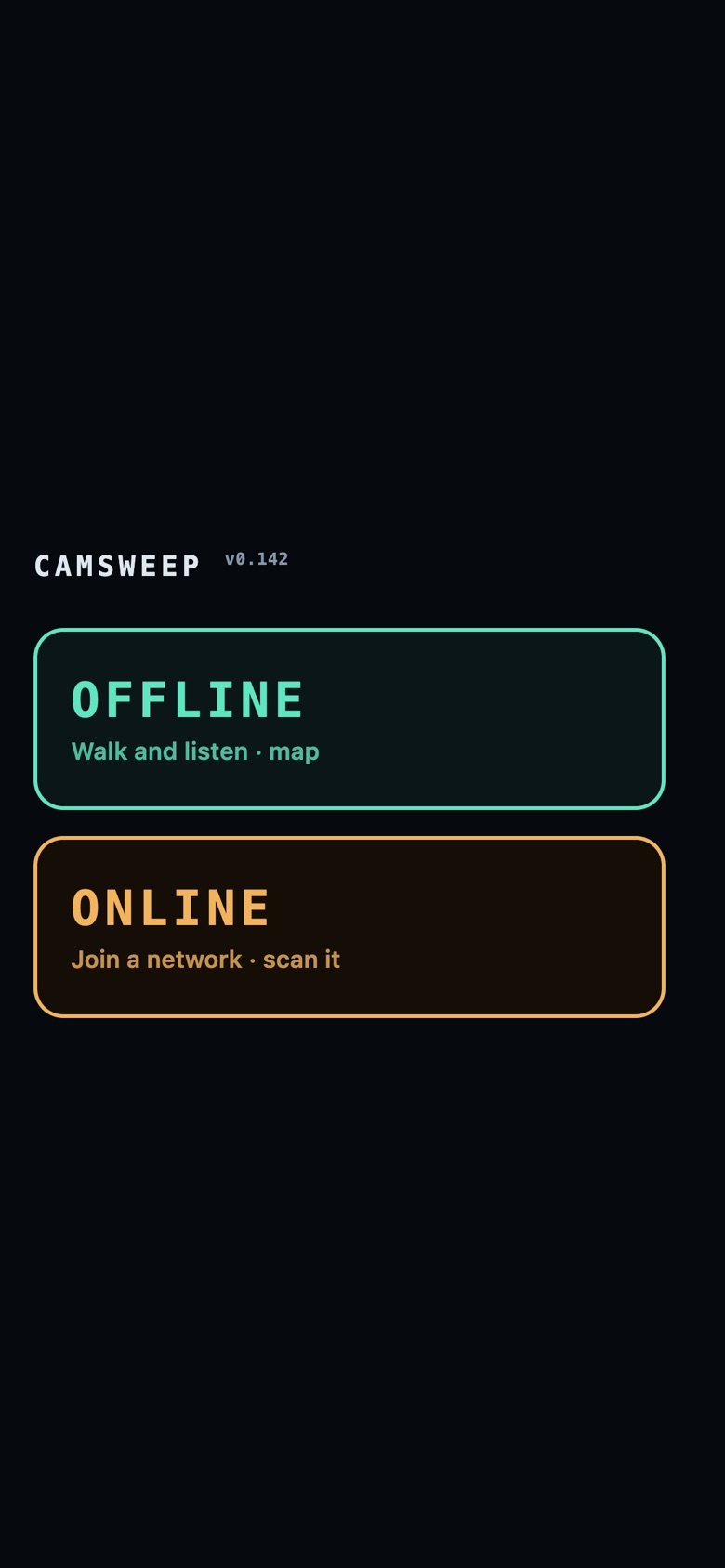
Start screen with the two modes, OFFLINE and ONLINE
Mode selection
9:41
OFFLINE: camera leads grouped by street address
OFFLINE · leads by address
9:41
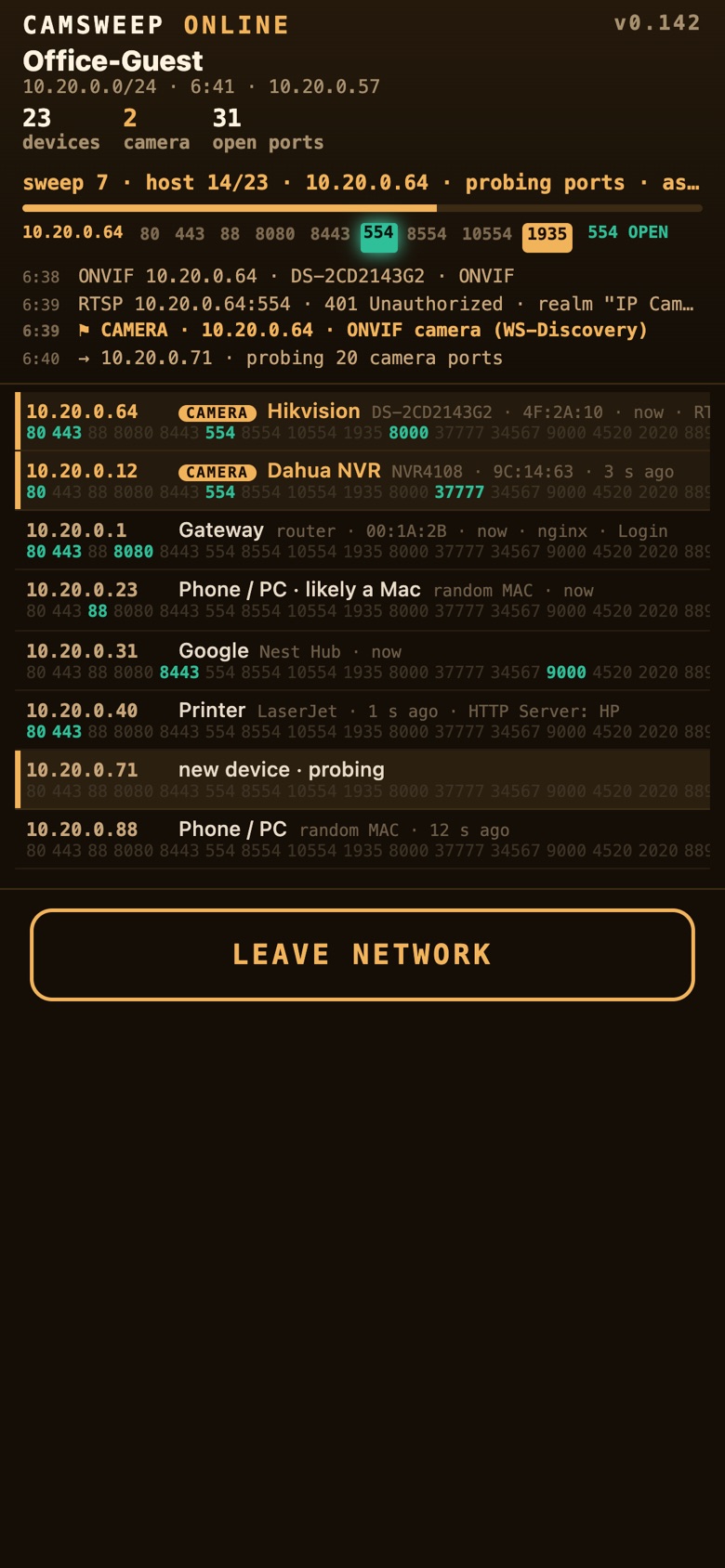
ONLINE: hosts on the network with camera ports and identified camera models
ONLINE · illustrative data
Detection

Six independent ways to recognise a camera.

A lead is never a single guess. Each indicator carries a confidence, the reasons are always shown, and indicators that contradict each other lower the confidence instead of being ignored.

01 · Manufacturer

Radio identity

The hardware address of a device reveals who built its radio. Dedicated camera makers are flagged directly; mixed vendors become candidates that need more evidence.

02 · Network names

System signatures

Camera base stations and alarm hubs announce recognisable network names. They are matched and placed as camera systems.

03 · Self-description

WPS and Bluetooth

Many devices broadcast their own make and model over Wi-Fi Protected Setup or Bluetooth LE. Camera names are recognised regardless of brand.

04 · Behaviour

Video upload pattern

A camera streaming to the cloud sends large frames at a steady rate in separate time windows. Phones, TVs and speakers are excluded by class, and a minimum bit rate is required.

05 · Learning

Known fingerprints

Probe and capability fingerprints that have been confirmed as cameras in earlier surveys are recognised again, even when the hardware address is unknown.

06 · Inspection

Services (ONLINE)

Open RTSP, ONVIF and vendor ports, and the answers to RTSP and web questions. A port that does not speak RTSP removes the camera flag rather than adding to it.

Guided field work

The unit tells the operator when to stop, and why.

Radio surveys fail when the operator walks past a camera before it has been heard properly. Camsweep adapts to the operator instead of the other way round.

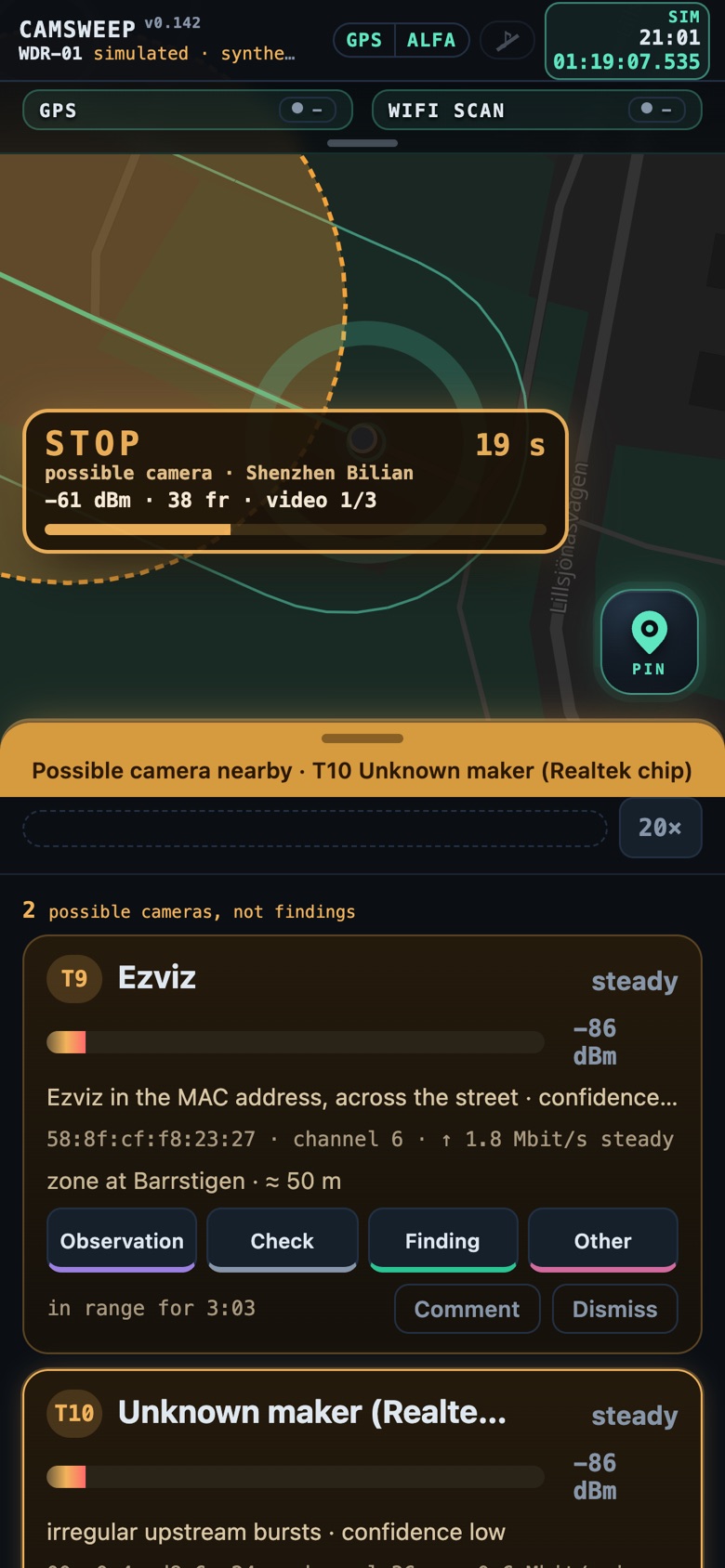
  • STOP. When a candidate needs confirmation, the radio locks on its channel and the operator gets a clear STOP with a countdown, live signal strength, frame count and evidence progress. When the evidence is in, the screen says FOUND or GO.
  • Adaptive pace. GNSS speed sets how long the radio stays on each channel: longer when standing still, shorter and focused on the busiest channels at vehicle speed.
  • Coverage ring. Standing still fills a ring around the operator; a full ring means a complete channel cycle was heard at that spot.
  • Placement with honesty. Each device is placed by a signal-weighted mean of every observation along the walk, drawn with an uncertainty radius that shrinks as evidence accumulates.
  • Auto-pause and resume. Ten minutes without movement pauses the radio to save battery; walking on resumes the session automatically, with or without the phone connected.
9:41
STOP prompt: the radio is locked on a candidate's channel with a countdown and evidence progress
STOP · confirming a candidate
Hardware

WDR-01 · Wireless Device Recorder

A bag-sized unit built from documented, replaceable components. The phone is only a display: all capture, analysis, maps and storage live on the unit.

ComputeQuad-core ARM single-board computer, 8 GB RAM, Linux. Live working data is kept in RAM; durable writes are batched to protect the storage medium.
Survey radioExternal dual-band USB adapter, MediaTek MT7612U, 2×2 MIMO, monitor mode on 2.4 GHz (HT20) and 5 GHz (80 MHz blocks). Per-antenna signal strength is reported for every frame.
BluetoothBuilt-in Bluetooth LE controller, passive scanning only (no scan requests).
Positioning and timeUSB GNSS receiver. Position for every observation; the system clock is disciplined by GNSS (chrony) when no network time is available.
Operator linkThe unit's own WPA2 access point. The phone connects directly; a welcome page opens automatically.
PowerStandard USB-C power bank. Typical draw 8 to 10 W. Low-voltage conditions are detected and shown to the operator.
ExpansionSecond survey radio for parallel band coverage; directional panel antenna on a dedicated radio for bearing measurement (in development).
Software

Built on open, auditable tools.

Capture

tshark (the command-line engine of Wireshark) records full packet captures in pcapng; scapy decodes 802.11 and Bluetooth HCI in real time.

Inspection

nmap for host discovery and port probes; native ONVIF WS-Discovery, SSDP and mDNS clients; RTSP and HTTP probes without credentials.

Maps

Offline vector maps (Protomaps) and an on-device address index. No map tiles or geocoding requests ever leave the unit.

Field view

A web application served by the unit itself and designed for one-handed use on a phone: large controls, no prose, the most important action first.

Replay

Any session can be replayed in 3D on the map with time, leads and notes, for review and briefings.

Recovery

The full system configuration is version-controlled. A replacement unit is rebuilt from a script.

Security model

Nothing leaves the device.

Camsweep is designed for work where the collected material is sensitive and where the tool itself must not become a risk. Data is bound to the unit and the operator's phone, and the survey radio is hardened against the networks it observes.

No cloud, no telemetry

Operation requires no account, no external service and no internet connection. Captures, sessions, maps and reports are stored on the unit only, and no collected data is sent anywhere.

Closed operator link

The phone talks to the unit over the unit's own WPA2 network. The field view is protected by a PIN with signed session tokens.

Hardened survey radio

The survey radio accepts no inbound connections. A dedicated firewall chain drops all unsolicited traffic on that interface, and the field view refuses any request arriving through it, so a network under inspection cannot reach the unit.

Silent by default

In OFFLINE mode the survey radio only receives: no probes, no associations. The only transmitter is the unit's own operator access point. ONLINE is a separate, explicit mode with its own screen and its own colour.

Credentials are not kept

A target network's password is used once to join and is never written to disk or to any log.

Controlled export

Material leaves the unit only when the operator copies a session off deliberately. A sealed export package with checksums is on the roadmap.

operator phone ──WPA2──▶ WDR-01 ◀──── monitor mode (receive only) ──── airspace │ ├── survey radio: inbound dropped · field view refuses this interface ├── storage: sessions, pcapng + SHA-256, notes, reports └── internet: not required for operation
Forensic focus

A record that holds up afterwards.

Camsweep treats every survey as potential evidence. What was heard, where, when and by which unit is preserved in a form that can be reviewed and verified later.

  • Raw capture. Every session keeps a full packet capture (pcapng) next to the analysed data, so findings can be re-examined with standard tools.
  • Integrity. Captures are sealed with SHA-256 checksums; an interrupted capture is closed and sealed at the next start, and marked as such.
  • Time and place. Every observation carries GNSS position and a timestamp from a clock disciplined by GNSS; the offsets of the receiver and the phone are measured and shown.
  • Append-only notes. Observations, checks and findings are timestamped; comments cannot be overwritten, only added.
  • Unit identity. Every record is labelled with the recording unit, so logs from several units can be merged without ambiguity.
  • Leads are not findings. The interface and the reports keep radio indications separate from what the operator verified on site.
  • Power-loss safe. Working data is checkpointed every minute and recovered automatically after an interruption.
9:41
Device detail: maker, model, open ports, RTSP answer, ONVIF address and the reasons it is classified as a camera
Device record with reasons · illustrative data
Use cases

Where Camsweep is used.

Investigation

Camera canvassing

Map private and commercial cameras around an incident location within minutes, grouped by address, to direct requests for footage before it is overwritten.

Protection

Venue and route sweeps

Establish which wireless cameras cover a venue, residence or route before a visit, and verify that nothing new has appeared since the last survey.

Assurance

Technical surveillance checks

Baseline the camera and recorder inventory of offices, meeting rooms and accommodation, and document deviations with a verifiable record.

Facilities

Network camera audits

With authorisation, inspect a site's network for cameras and recorders, identify make and model, and list exposed video and management services.

Field research

Documentation

Journalists and researchers documenting surveillance in public space get a structured, timestamped and geolocated record instead of photographs and notes.

Training

Simulation mode

A built-in simulation with synthetic data lets operators practise the full workflow without a unit and without touching real data.

Limitations

What Camsweep does not do.

Radio survey finds devices that use radio. Cameras that are wired, or that transmit only over the cellular network, are not detected directly; they are often found indirectly through Bluetooth set-up beacons, base stations and the camera density of a building.

A radio lead indicates that a camera is likely nearby and roughly where. It is not proof of a camera, of what it records or of who owns it. Verification on site remains the operator's task, and the tool is designed to keep that distinction visible.

Camsweep does not decrypt traffic, does not break into devices, does not try passwords and does not interfere with any network. ONLINE mode is only for networks the operator is entitled to inspect.

Status

In active field testing.

Camsweep is a working prototype under continuous development and field trials in Sweden. Hardware and software are developed in-house; the field view, detection rules and evidence handling are refined after every survey.

For demonstrations, pilots or technical questions, contact David Bicho.

Roadmap
  • Second survey radio for parallel 2.4 and 5 GHz coverage
  • Directional antenna and compass-assisted bearing measurement
  • Coverage heat map showing how thoroughly each location was surveyed
  • Sealed session export (archive and checksums) for case files
  • Multi-unit merging of surveys of the same area