DriveSweep
version 0.2.20 · Windows
Format USB sticks, memory cards and disks. Simple when you want it, thorough when you need it. One file to run. Nothing to install.
Download DriveSweep_v0.2.20.exe
SHA-256 4878aac88c3c0f203eb96b6dff43275817c8309ac493568847e0e6104ef63ae3
Two modes
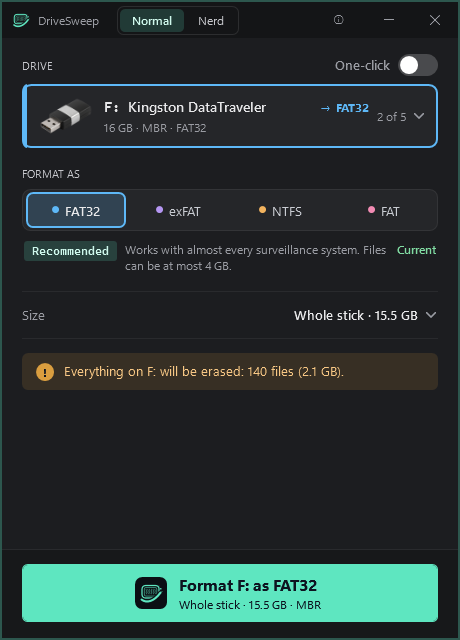
- Normal Mode. A small, slim window: the stick, FAT32, exFAT, NTFS or FAT, the size, and one big Format button. Confirm, done. With One-click each format gets its own Format! button.
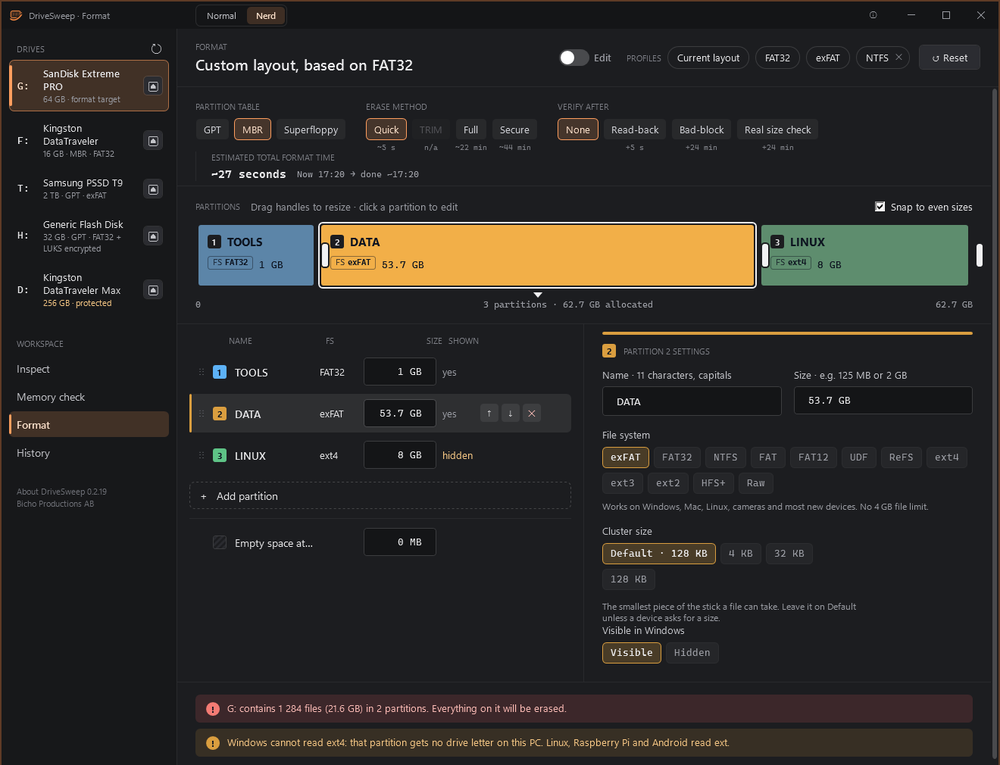
- Nerd Mode. Everything: several partitions, MBR, GPT or superfloppy, saved profiles, start from the drive's current layout, quick, full or secure erase, speed test, surface scan and real size checks that expose fake sticks.
Compared with Format in Windows
- Windows formats one partition and leaves the rest of the stick as it was. DriveSweep makes the whole stick new: a fresh partition table and one partition, with nothing left over from cameras, Macs, Linux or disk images.
- Windows will not make FAT32 larger than 32 GB. DriveSweep does, up to 2 TB, and can make a 32 GB partition on a larger stick, which many DVRs want.
- A stick Windows can't read, or shows without a drive letter, can't be right-clicked. DriveSweep lists it anyway.
- Before it erases, DriveSweep shows what is on the stick and checks that it is still the same stick.
File systems
- Windows' own: FAT32 (also above 32 GB), exFAT, NTFS, UDF, ReFS (only some Windows editions can make it).
- Written by DriveSweep itself, no extra programs: FAT (FAT16) and FAT12 for old devices, ext2, ext3, ext4 for Linux and Raspberry Pi, and HFS+ (Mac OS Extended, journaled) for Macs. Each was checked with the Linux and Mac file system checkers.
Safe by design
- Only USB and SD drives are listed. The PC's own disks and the drive DriveSweep runs from are protected.
- The drive's identity is checked before every step; if it is removed or swapped, the job stops before anything else is written.
Good to know
- Formatting and full checks need administrator.
- Not code-signed yet. Windows SmartScreen may warn the first time (More info, Run anyway). PCs with Smart App Control or application control may block it.
- A folder called System Volume Information shows up after formatting. Windows makes it on every drive it mounts, not DriveSweep. The file WPSettings.dat inside is a tiny binary file from the Windows Storage Service. Opened in a text editor it looks like Chinese characters, because the editor reads the bytes as text. It is harmless, and Windows makes it again if you delete it.
- Replaces DiskSweep, StickSweep and MemSweep. Settings and history are kept in
%APPDATA%\DiskSweep.